
A cable gland schedule template for EPC projects helps electrical engineers record the gland required at each cable termination and turn reviewed selections into a consistent bill of quantities (BOQ). For projects managed from Gujarat, including packages supplied through Jamnagar, the same discipline helps design, site and procurement teams work from one controlled record instead of reconciling separate spreadsheets at purchase order stage.
This guide shows how to build a cable gland schedule format, prepare a cable gland BOQ template, and assemble a supplier request for quotation (RFQ). The accompanying cable gland schedule Excel template contains a schedule sheet, an approved-selection BOQ summary, an RFQ checklist and an example workflow. It records engineering decisions; it does not select or certify a gland automatically.
Download the Cable Gland Schedule Excel Template
Use the Exgrip Excel workbook to record cable gland requirements by termination, review proposed selections, prepare a BOQ summary and organise supplier RFQ information. It includes a cable gland schedule, an approved-selection BOQ summary, an RFQ checklist and a worked example. The example data is illustrative; verify all project inputs and product selections before use.
Start with the Read Me worksheet, then enter project data in the schedule. The BOQ summary counts only rows marked Approved; it does not select or certify a gland automatically.
What a Cable Gland Schedule Must Record for Each Termination
A cable register identifies the cable route, tag and electrical details. A cable gland schedule adds the termination data needed to specify the gland and entry hardware. The same cable may have different entry threads, enclosure details or environments at its field and panel ends.
Use one row per termination end unless the project permits grouping identical terminations. State how many termination points each row represents. Do not assume both ends use the same gland.
| Schedule Field | What to Record | Why It Is Required |
|---|---|---|
| Cable Tag and Termination End | Approved cable tag, from/to equipment, and the end being specified. | Connects the gland selection to the correct equipment entry. |
| Cable Construction | Cable type, armour or screen construction, and relevant cable datasheet reference. | Gland type depends on the actual cable construction and installation. |
| Dimensions | Overall cable outside diameter and, where relevant, bedding or armour dimensions. | Allows comparison with the manufacturer’s documented clamping ranges. |
| Entry Details | Thread standard and size, or the specified enclosure entry/hole details. | Prevents a selected gland from being incompatible with the equipment entry. |
| Gland and Accessories | Approved type, model/size, material, quantity, and required accessories. | Creates a clear line item for technical review and procurement. |
| Project Requirements | Required protection, environmental duty, and area classification or certificate reference, where applicable. | Shows which requirements must be checked before approval. |
| Document Control | Source document revision, selection status, reviewer, and remarks. | Prevents unresolved assumptions from silently becoming purchase requirements. |
Use Exgrip’s Cable Gland Selection Chart with the current cable datasheet, equipment drawing, project specification and product documentation. A chart does not replace checks against the actual cable and entry.
Collect 5 Sets of Source Data Before Selecting a Gland
A schedule is only as reliable as its inputs. Record the source of each requirement and mark missing data before a gland is proposed. These five data sets prevent gaps reaching the RFQ stage.
- Cable identification and revision. Use the current approved cable register and capture the tag, origin, destination and datasheet revision. Resolve any conflict between the register and vendor data before selecting a gland.
- Cable construction and dimensions. Record cable type and armour or screen arrangement. Obtain actual overall OD and any bedding or armour dimensions needed for the gland design. Conductor cross-sectional area alone does not define clamping suitability.
- Equipment entry details. Use the equipment drawing to confirm thread standard, size, entry opening and available clearance. Record Metric, NPT, PG or another thread form only when documented. Do not assume similar-looking threads are interchangeable.
- Installation environment. Record required ingress protection, exposure, temperature conditions and material requirements. Brass, nickel-plated brass and stainless steel are available options, but project conditions and approved product data must determine the choice.
- Compliance and accessories. Where hazardous-area requirements apply, record the area classification and required protection concept, then verify the certificate and product marking. Include locknuts, earth tags, washers, reducers or adaptors only where specified by the design.
Reference source documents so reviewers can trace each dimension or requirement.
Build the Cable Gland Schedule in 6 Reviewable Steps
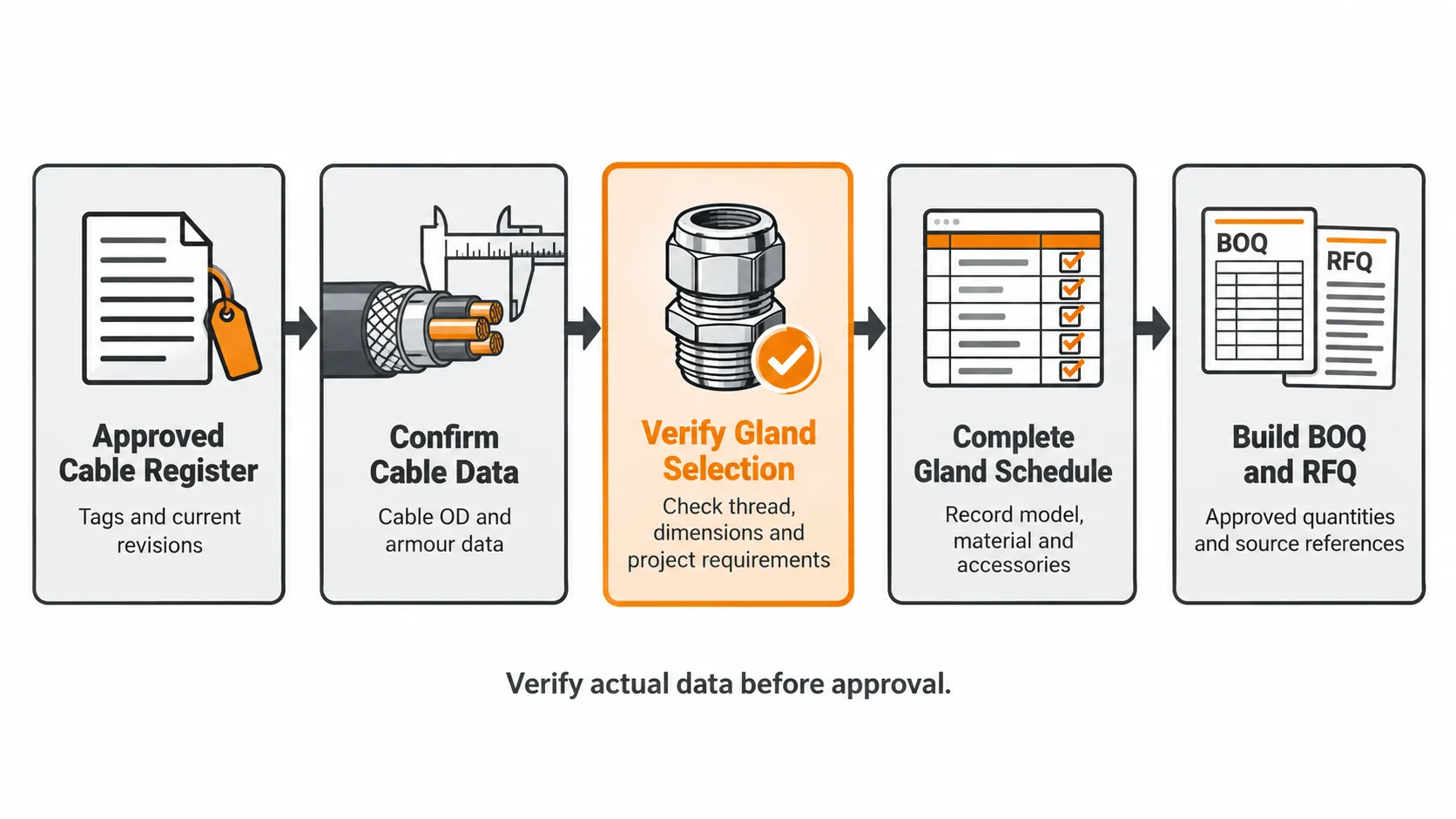
Import the approved cable list
Copy tags and source/destination equipment references, preserving tag spelling and revision for procurement reconciliation.
Separate termination ends
Create a row for each end when requirements differ. Group rows only when cable construction, dimensions, entry, gland and accessories are identical.
Fill verified dimensions and entry information
Use cable supplier data and the latest equipment drawing. Put missing values on hold rather than inferring them.
Check the complete application before proposing a gland
Match construction and dimensions to the manufacturer’s documented range, then check entry compatibility, environment and project requirements. Leave the model/size unselected while checks remain open.
Record accessories and references
List specified accessories and relevant datasheet or certificate references. Include each accessory only when the installation design requires it.
Submit for review
Record status and reviewer. Rows with missing dimensions, an unresolved thread or unchecked compliance requirements stay on hold and out of the BOQ.
The workbook uses Not started, In review, Approved, Hold for missing data and Rejected statuses. BOQ formulas count only Approved rows matching model/size, thread and material. Set a row to Approved only after review.
Worked Example: How a Cable Register Becomes a Gland Schedule
This cable gland schedule example leaves the gland model and size unselected. Replace every field with approved cable and equipment data before project use.
| Field | Illustrative record | Required action before approval |
|---|---|---|
| Cable tag | EX-PWR-001 (example only) | Verify the tag and revision against the approved cable register. |
| Termination end | Motor end | Check the motor terminal-box drawing and entry position. |
| Cable construction | Armoured power cable | Confirm the armour construction and cable type from the datasheet. |
| Overall OD and bedding/armour dimensions | Pending datasheet | Record actual dimensions and compare them with the gland manufacturer’s documented ranges. |
| Entry thread or hole | Pending equipment drawing | Confirm thread form, nominal size and entry constraints. |
| Proposed gland model/size | Not selected | Leave on hold until cable, entry, environment and project requirements are checked. |
| Selection status | Hold for missing data | Change to Approved only after documented technical review. |
This is not a size-selection recommendation. Obtain missing dimensions from the cable supplier or responsible engineer, and resolve an unknown entry thread before requesting a firm quotation. Provisional values must not be sent to procurement as approved specifications.
Convert the Approved Schedule into a BOQ Without Double-Counting
This BOQ example shows how a cable gland quantity takeoff should start from approved schedule lines, not a raw count of cable tags. One cable can have two different termination specifications. Identical terminations may be grouped only when project controls permit it and the quantity is explicit. Use a consistent bill of quantities format; if the project already prescribes a cable gland BOQ format or a BOQ format in Excel, map the approved schedule data into it without changing the engineering selection to fit the spreadsheet.
| BOQ field | Aggregation rule | Check before issue |
|---|---|---|
| Gland description / model and size | Group only identical, technically approved items. | Do not merge different sizes or model variants. |
| Entry thread | Keep separate where thread specification differs. | Confirm the thread matches the equipment entry. |
| Material / finish | Keep separate for different approved materials or finishes. | Do not combine brass, nickel-plated brass and stainless-steel items into one line. |
| Base quantity | Sum the quantities on matching Approved schedule rows. | Exclude items on hold, in review or rejected. |
| Spare quantity | Apply the project-defined spare policy as a separate allowance. | Do not assume a standard spare percentage where none is specified. |
| Accessories | Count specified accessories on their own basis. | Check whether accessories are supplied separately or included in the quoted gland assembly. |
In the Excel BOQ Summary sheet, enter the approved model/size, thread and material. The formula totals only matching rows marked Approved. Spare allowance is editable and the calculated spare quantity rounds up to a whole item; use the project spare policy rather than treating the allowance as mandatory. Download the cable gland schedule Excel template to follow these steps in the workbook.
Before issue, reconcile the BOQ to the schedule, check duplicate tags or accessories, and record reasons for manual adjustments.
Prepare a 6 Item RFQ Package Suppliers Can Price Consistently
A cable gland RFQ should give every supplier the same technical basis. Quantity and cable cross-sectional area alone leave room for different assumptions about diameter, thread, gland type and accessories. The role of RFQ in procurement is to give bidders consistent inputs and a way to declare exceptions.
The workbook’s cable gland RFQ checklist also acts as a cable gland procurement checklist. Use it to collect the following before the enquiry is issued:
- The latest cable gland schedule, cable register and the relevant cable and equipment datasheets.
- Quantities broken down by approved model/size, entry thread, material and specified accessories.
- Project requirements for ingress protection, environment and hazardous-area compliance where applicable, including the exact documents that the supplier must submit.
- The applicable project specifications and revisions, with a clear request for the supplier to list deviations, exclusions or substitutions.
- Required technical documents, dimensional drawings and certificates where relevant to the specified product and installation.
- Commercial response fields requested by procurement, such as unit price, delivery lead time, quotation validity and delivery destination.
Keep commercial responses separate from the approved technical schedule. During the RFQ process, use a consistent RFQ format for all suppliers and ask them to list deviations before acceptance. If an RFQ template or RFQ Excel template is used, treat a vendor-suggested equivalent as a deviation; do not overwrite an approved model/size without technical review.
Use the current Exgrip technical reference with the applicable product documentation. Certificate references must match the offered product and the project’s actual requirements.
6 Schedule Errors to Catch Before Procurement
- Using cable cross-sectional area as the only sizing input. The cable CSA does not replace actual OD and any bedding or armour dimensions required by the gland design. Check the documented clamping range.
- Assuming both cable ends are identical. A motor terminal box and a control-panel entry may have different threads or different required gland specifications. Record them separately when needed.
- Entering a thread from memory. A thread form or size that does not match the equipment entry can require rework or an adaptor. Verify it against the drawing and project specification.
- Omitting accessories from the quantities. Locknuts, earth tags, washers, reducers and adaptors should be included only when the design calls for them, but required items must not be left out of the RFQ.
- Mixing approved and provisional selections. A proposed model is not an approved model. Use a visible hold status while source data or technical review is incomplete.
- Using a certificate reference without checking scope. Where hazardous-area requirements apply, verify the exact product identification, marking, certificate and any conditions of use required by the project.
Resolve these points during schedule review. A missing thread or dimension discovered after order placement can trigger supplier clarifications, a revised BOQ and delays while the entry arrangement is confirmed.
Control Schedule Revisions with Source Document References
Record the project number, document number, revision, date, preparer, reviewer and approval authority in the controlled project document or transmittal. When cable or equipment data changes, identify affected rows and revisit their status. A model left in a cell is not proof that its approval remains valid.
Where hazardous-area documentation is required, record the area classification and certificate reference reviewed. Confirm the exact product, marking and conditions against the project requirements; a generic certification note cannot replace this check.
Treat the cable gland specification schedule as a controlled engineering record. Its revision history shows what was specified and what changed, especially where the package has several enclosures or both armoured and unarmoured cables.
Conclusion & Call-to-Action
Release the cable gland BOQ only when the cable dimensions, equipment entry, proposed gland, accessories and applicable project requirements are traceable to current documents. That makes the quotation easier to compare and reduces clarification cycles caused by missing or assumed data.
Use the schedule and RFQ checklist together, keep unverified lines on hold, and aggregate only approved selections. Exgrip’s cable gland product range can support the review; the final model must match the actual installation.
📩 Talk to our technical team today at Exgrip.com
📞 Or call us directly for quick assistance!
Contact Us:
📞 Phone: +91 9537118899
🌐 Website: www.exgrip.com
📩 Request a Quote: Contact Page
FAQs
What is a cable gland schedule?
It lists gland requirements by termination, including cable and equipment references, dimensions, entry details, proposed gland, accessories, quantity, sources and review status.
Is a cable gland schedule the same as a cable schedule?
No. A cable schedule records cable identification and routing or electrical data. A gland schedule adds termination dimensions, entry thread, gland specification, accessories and review status.
Which dimensions are needed to select a cable gland?
Use actual overall OD and any bedding or armour dimensions relevant to the gland design. Check the cable datasheet against the manufacturer’s documented range; cross-sectional area alone is not enough.
How do I prepare a cable gland BOQ?
Group only approved selections that match in model/size, entry thread and material. Sum the quantity represented by each schedule line, count specified accessories separately where needed, and apply the project’s spare policy rather than assuming one.
Should one cable be counted as two cable glands?
Not automatically as two identical items. Each end needs to be considered, but different equipment entries or conditions can require different gland specifications. Record both ends separately when their requirements differ, then total the approved selections.
What should an RFQ include for cable glands?
Include the current schedule, cable/equipment data, approved quantities, accessories, project requirements and requested documents. Require suppliers to list deviations for review.
How should hazardous-area requirements be recorded?
Record the actual area classification and the required protection and certificate references where applicable. Verify the exact offered product marking, certificate scope and any conditions against project requirements. For product-specific information, use the Exgrip technical reference alongside the approved project documents.